
锐捷交换机初始化enable密码,适用12.x版本
一、功能说明:
正式版本rboot shell封掉后,不支持ctrl+c 这种方式做密码恢复的,只能通过ctrl+B的方式,进入Boot无密码登录设备查看或修改设备密码
注意:
1、此方式下只是提供首次无密码登录设备,设备原配置不会丢失;
2、若首次无密码登录设备后,未修改密码情况下退出登录设备,仍会要求使用密码登录。
二、操作步骤:
步骤一:Ctrl+B进入BOOT模式
设备下电重启后,当看到Ctrl+B提示,连续按Ctrl+B,进入boot界面。
示例如下:
Press Ctrl+B to enter Boot Menu, Press Ctrl+C to enter Rboot 0
Entering simple UI....
====== BootLoader Menu("Ctrl+Z" to upper level) ======
TOP menu items.
************************************************
0. XModem utilities.
1. Run main.
2. Run rboot.
3. Scattered utilities.
************************************************
Press a key to run the command: 3 //选择3,进入Scattered utilities菜单
步骤二:进入Scattered utilities菜单
====== BootLoader Menu("Ctrl+Z" to upper level) ======
Scattered utilities.
************************************************
0. Show the bootloader version.
1. Reload system.
2. Set baudrate.
3. Set default environment.
4. Set debug mode.
5. Run main without enable password.
************************************************
Press a key to run the command: 5 //选择5,无密码启动主程序
步骤三:确定无密码启动主程序
The system will start immediately without enable password.
Confirm? [Y/N]: Y //选择Y后,设备自动重启,重启后可无密码登录设备,配置不会丢失!!!
ubi0: attaching mtd2
ubi0: scanning is finished
ubi0: attached mtd2 (name "mtd=10", size 500 MiB)
ubi0: PEB size: 131072 bytes (128 KiB), LEB size: 126976 bytes
ubi0: min./max. I/O unit sizes: 2048/2048, sub-page size 2048
ubi0: VID header offset: 2048 (aligned 2048), data offset: 4096
ubi0: good PEBs: 4000, bad PEBs: 0, corrupted PEBs: 0
ubi0: user volume: 1, internal volumes: 1, max. volumes count: 128
ubi0: max/mean erase counter: 18/14, WL threshold: 4096, image sequence number: 1159041294
ubi0: available PEBs: 0, total reserved PEBs: 4000, PEBs reserved for bad PEB handling: 160
Loading file '/boot/kernel.img' to addr 0x64000000...
Done
Loading file '/boot/initrd.img' to addr 0x64300000...
Done
Loading file '/boot/fdt.img' to addr 0x64a00000...
Done
... ...
Press RETURN to get started //看到此信息,可无密码登录设备
步骤四:无密码进入系统后,可查看原用户名和密码;若原密码加密,可选择修改新用户名和密码
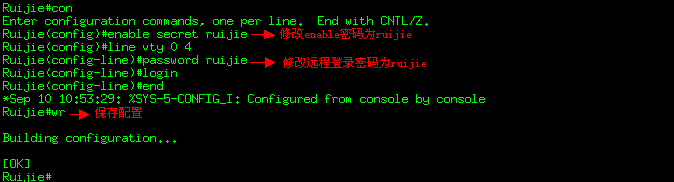
步骤五:功能验证
重新登入交换机,用新的用户名和密码登入,确认能登入成功
共有 0 条评论