
Java网络编程 – UDP通信
文章目录
-
- UDP通信
-
- 快速入门
- 一发一收
- 多发多收
- 广播组播
UDP通信
快速入门
UDP协议的特点:
UDP协议通信首先要有DatagramPacket数据包对象:
| 构造器 | 说明 |
|---|---|
| DatagramPacket(byte[] buf, int length, InetAddress address, int port) | 创建发送端数据包对象 buf:要发送的内容,字节数组 length:要发送内容的字节长度 address:接收端的IP地址对象 port:接收端的端口号 |
| DatagramPacket(byte[] buf, int length) | 创建接收端的数据包对象 buf:用来存储接收的内容 length:能够接收内容的长度 |
| 方法 | 说明 |
|---|---|
| getLength() | 服务端可以获得实际接收到的字节个数 |
| getAddress() | 获取发送端的ip地址 |
| getPort() | 获取发送端的端口 |
其次要有发送端和接收端对象:
| 构造器 | 说明 |
|---|---|
| DatagramSocket() | 创建发送端的Socket对象,系统会随机分配一个端口号。 |
| DatagramSocket(int port) | 创建接收端的Socket对象并指定端口号 |
| 方法 | 说明 |
|---|---|
| send(DatagramPacket dp) | 发送数据包 |
| receive(DatagramPacket p) | 接收数据包 |
一发一收
下面我们在代码中使用UDP通信, 实现客户端发送一条消息、服务端接收一条消息
/** 发送端 */ public class ClientDemo { public static void main(String[] args) throws Exception { // 1. 创建发送端对象, 发送端自带默认端口号, 也可以指定端口号 DatagramSocket socket = new DatagramSocket(); // 2. 创建一个数据包对象, 封装要发送的数据 byte[] buffer = "我是要发送的数据".getBytes(); /** 参数一: 封装要发送的数据 参数二: 要发送数据的长度 参数三: 服务端的地址对象 参数四: 服务端的端口号 */ DatagramPacket packet = new DatagramPacket(buffer, buffer.length, InetAddress.getLocalHost(), 8888); // 3. 使用发送端send方法, 用数据包发送对象 socket.send(packet); // 4. 释放资源 socket.close(); } } package com.chenyq.d2_udp1; import java.net.DatagramPacket; import java.net.DatagramSocket; /** 服务端 */ public class ServerDemo { public static void main(String[] args) throws Exception { // 1. 创建接收端对象 DatagramSocket socket = new DatagramSocket(8888); // 2. 创建一个数据包对象接受数据 byte[] buffer = new byte[1024 * 64]; DatagramPacket packet = new DatagramPacket(buffer, buffer.length); // 3. 使用接收端的receive方法, 用数据包接受数据 socket.receive(packet); // 4. 根据实际接受数据的字节个数获取结果 int len = packet.getLength(); String res = new String(buffer, 0 , len); // 将字节数据转为字符串 System.out.println(res); // 5. 释放资源 socket.close(); } } 多发多收
需求
- 使用UDP通信方式开发接收端和发送端。
分析
- 发送端可以一直发送消息。
- 接收端可以不断的接收多个发送端的消息展示。
- 发送端输入了exit则结束发送端程序。
/** 发送端 */ public class ClientDemo { public static void main(String[] args) throws Exception { // 1. 创建发送端对象, 使用默认端口发送 DatagramSocket socket = new DatagramSocket(); // 2. 使用while死循环不断地接收用户输入数据, 如果输入exit则退出程序 Scanner sc = new Scanner(System.in); while (true) { System.out.println("发送消息: "); String inp = sc.nextLine(); // 3. 用户输入exit则下线 if ("exit".equals(inp)) { System.out.println("下线成功"); socket.close(); // 释放资源 break; } // 使用DatagramSocket对象的send方法将数据包对象进行发送 byte[] buffer = inp.getBytes(); // 创建数据包对象 DatagramPacket packet = new DatagramPacket(buffer, buffer.length, InetAddress.getLocalHost(), 8888); socket.send(packet); } } } /** 接收端 */ public class ServerDemo { public static void main(String[] args) throws Exception { // 1. 创建接收端对象 DatagramSocket socket = new DatagramSocket(8888); // 2. 创建数据包对象 byte[] buffer = new byte[1024 * 64]; DatagramPacket packet = new DatagramPacket(buffer, buffer.length); // 3. 不断地接受数据 while (true) { socket.receive(packet); int len = packet.getLength(); String res = new String(buffer, 0, len); System.out.println("收到了来自" + packet.getAddress() + "的消息: " + res); } } } 广播组播
UDP的三种通信方式:
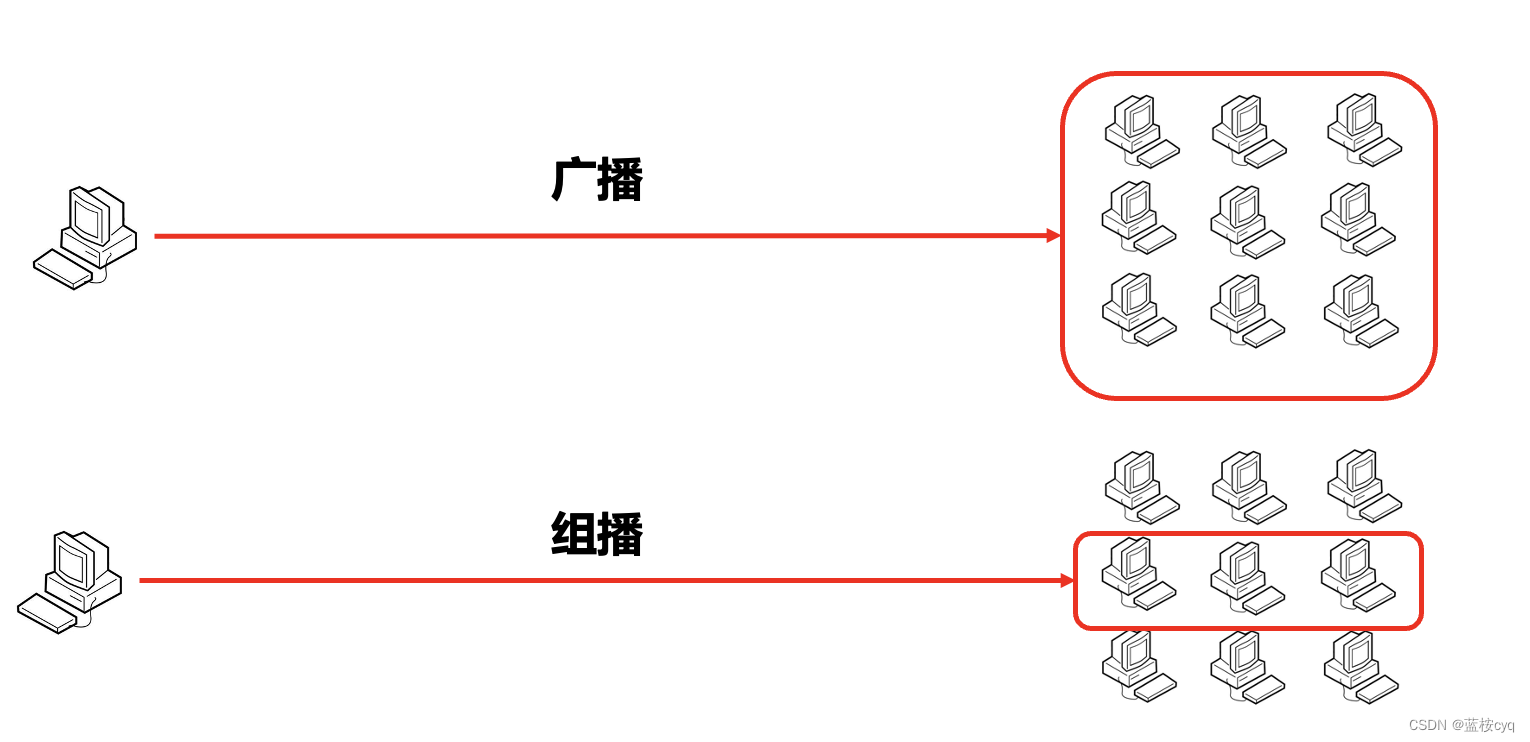
UDP如何实现广播:
/** 发送端 */ public class ClientDemo { public static void main(String[] args) throws Exception { DatagramSocket socket = new DatagramSocket(); Scanner sc = new Scanner(System.in); while (true) { System.out.println("发送消息: "); String inp = sc.nextLine(); if ("exit".equals(inp)) { System.out.println("下线成功"); break; } byte[] buffer = inp.getBytes(); // 发送的地址应该是广播地址 DatagramPacket packet = new DatagramPacket(buffer, buffer.length, InetAddress.getByName("255.255.255.255"), 9999); socket.send(packet); } } } /** 接收端 */ public class ServerDemo { public static void main(String[] args) throws Exception { // 注册相同的端口号即可收取广播发送的消息 DatagramSocket socket = new DatagramSocket(9999); byte[] buffer = new byte[1024 * 64]; DatagramPacket packet = new DatagramPacket(buffer, buffer.length); while (true) { socket.receive(packet); int len = packet.getLength(); String res = new String(buffer, 0, len); System.out.println("收到了来自" + packet.getAddress() + "的消息: " + res); } } } UDP如何实现组播:
/** 发送端 */ public class ClientDemo { public static void main(String[] args) throws Exception { DatagramSocket socket = new DatagramSocket(); Scanner sc = new Scanner(System.in); while (true) { System.out.println("发送消息: "); String inp = sc.nextLine(); if ("exit".equals(inp)) { System.out.println("下线成功"); break; } byte[] buffer = inp.getBytes(); // 发送的地址使用组播地址 DatagramPacket packet = new DatagramPacket(buffer, buffer.length, InetAddress.getByName("224.0.1.1"), 8888); socket.send(packet); } } } /** 接收端 */ public class ServerDemo { public static void main(String[] args) throws Exception { // 使用DatagramSocket的子类MulticastSocket可以在接收端绑定组播IP MulticastSocket socket = new MulticastSocket(8888); // 把当前接收端加入到一个组播组中去: 绑定对应的组播消息的组播IP socket.joinGroup(InetAddress.getByName("224.0.1.1")); byte[] buffer = new byte[1024 * 64]; DatagramPacket packet = new DatagramPacket(buffer, buffer.length); while (true) { socket.receive(packet); int len = packet.getLength(); String res = new String(buffer, 0, len); System.out.println("收到了来自" + packet.getAddress() + "的消息: " + res); } } }
版权声明:本文内容由互联网用户撰写,该文观点仅代表作者本人。本站爱分享仅提供分享服务,不拥有所有权,不承担相关法律责任。如发现本站有涉嫌抄袭侵权/违法违规的内容,请立马联系本站,本站将立刻删除。
THE END
二维码
共有 0 条评论